
Sales teams have always carried a heavy administrative burden. Manually logging calls, chasing follow-ups, updating spreadsheets, and piecing together lead data from a dozen different sources. But today, the way teams manage their pipelines is shifting fast. If you are evaluating the best CRM software for small business, one of the most important factors to consider is not just what it tracks, but what it automates.
Modern Cloud CRM platforms are quietly replacing entire categories of manual sales work, freeing your team to focus on what actually closes deals: building relationships and having real conversations.
In this blog, we will break down exactly which manual tasks automation is taking over, why this matters for growing businesses, and what to look for in a CRM built for modern sales teams.
The Manual Sales Problem No One Talks About
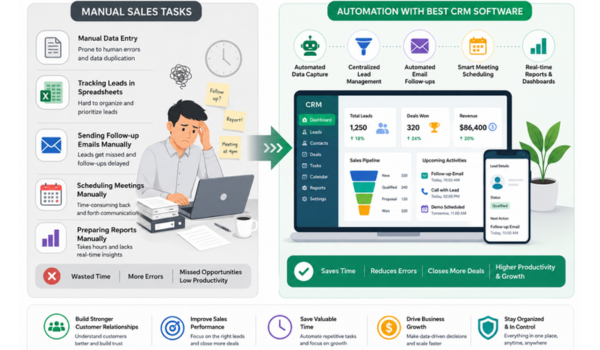
Before we talk about automation, it helps to name the problem clearly. Research consistently shows that sales representatives spend less than 35% of their time actually selling. The rest goes toward data entry, scheduling, internal reporting, and hunting down information that should already be at their fingertips.
For small and mid-sized businesses, this is even more painful. With lean teams and stretched resources, every hour spent on manual tasks is an hour not spent closing revenue.
When a salesperson has to manually log every call, manually send follow-up emails, and manually update deal stages in a spreadsheet, errors creep in, leads fall through the cracks, and managers lose visibility into what is actually happening.
This is the exact gap that CRM automation is designed to close.
What Automation in Cloud CRM Actually Does?
CRM automation is not about replacing salespeople. It is about removing the low-value, repetitive work that slows them down. Here are the key areas where automation is making the biggest difference.
1. Automated Lead Capture and Assignment
Manually importing leads from forms, emails, and social channels into a CRM is one of the most error-prone tasks in any sales process. A cloud-based CRM with automation captures leads from multiple entry points: website forms, WhatsApp, email campaigns, and third-party integrations.
The system instantly routes them to the right sales representative based on predefined rules. No copy-paste, no missed leads, no delays. The moment a lead comes in, the right person owns it.
2. Follow-Up Reminders and Drip Sequences
Following up at the right time is one of the most critical and most neglected parts of the sales cycle. Studies suggest it takes anywhere from five to eight touchpoints before a prospect is ready to buy. Manually tracking where each lead stands and remembering when to follow up is simply not sustainable at scale.
Automation solves this through drip sequences and trigger-based reminders. When a lead goes quiet for a set number of days, the system automatically flags it or sends a pre-scheduled follow-up message.
When a deal stage changes, the next action is triggered without the sales rep having to remember. This kind of CRM automation for small business sales ensures that no lead is ever forgotten, without adding to anyone’s to-do list.
3. Automatic Activity Logging
Every call, email, and meeting used to require manual logging. In a modern cloud CRM, email integrations and communication tools automatically record interactions against the relevant contact or deal. Sales reps no longer need to update the system manually after every conversation.
The CRM builds a complete, real-time timeline of every touchpoint invaluable for both individual reps and managers reviewing deal health.
4. Pipeline Stage Updates and Deal Progression
Moving deals manually through a pipeline adds friction and introduces inconsistency. Automated workflow rules can trigger stage changes, assign tasks, or notify managers when a deal moves forward or stalls.
This keeps the pipeline accurate in real time and eliminates the need for weekly manual audits to figure out where everything stands.
5. Invoice and Payment Reminders
For service-led teams, billing follow-ups are just as important as sales follow-ups. A CRM that includes invoice tracking with automated payment reminders removes the awkward manual task of chasing clients for dues.
Reminders go out on schedule, payment status updates automatically, and your team never has to maintain a separate spreadsheet to track what has been paid and what has not.
6. Reporting and Performance Dashboards
Manually compiling weekly sales reports from individual reps is a time sink for managers. Automated dashboards in a cloud CRM aggregate data in real time.
Conversion rates, revenue forecasts, deal velocity, and individual rep performance, without anyone having to export spreadsheets and build pivot tables. When leadership needs a clear picture of pipeline health, it is already there.
Cloud CRM Automation Benefits That Go Beyond Saving Time
The cloud CRM automation benefits extend well beyond productivity. Here is what businesses typically see after making the shift:
- Fewer leads slipping through the cracks: Automated capture and follow-up sequences mean every lead gets consistent attention, regardless of how busy the team is.
- More consistent customer experience: Automated touchpoints ensure prospects and clients are engaged on time, every time. Not just when a rep remembers to reach out.
- Better data quality: When the system logs activities automatically, data is cleaner and more complete than when it depends on individual reps to update records manually.
- Faster onboarding for new reps: Automation reduces dependence on institutional knowledge. A new rep can follow the system’s prompts and still deliver a consistent sales process from day one.
- Scalable growth without proportional overhead: As your team grows, automated workflows scale with you. You do not need to hire more people just to handle the administrative side of sales.
Why Use CRM for Sales Automation Rather Than Standalone Tools?
Many teams try to patch together automation using separate tools and email tool here, a scheduling app there, a spreadsheet macro somewhere else. The problem with this approach is fragmentation. Data lives in silos, handoffs break down, and the team spends time switching between platforms instead of selling.
A unified Cloud CRM that has automation built directly into the sales workflow means all your lead data, communication history, task management, and reporting live in one place. When an automation fires, it acts on real, up-to-date data not a copy that was exported last Tuesday. This is a fundamental advantage over stitching together separate tools that do not talk to each other cleanly.
Key CRM Automation Software Features to Look For
Not all CRM platforms approach automation the same way. When evaluating CRM automation software features, look for:
- Omnichannel lead capture that automatically pulls in leads from web forms, WhatsApp, email, and other channels
- Trigger-based workflow automation that responds to deal stage changes, time delays, and custom conditions
- Automated follow-up sequences and drip campaigns that can be tailored to your sales cycle
- Built-in invoice and payment tracking with automated reminders
- Real-time dashboards that update automatically without manual data entry
- WhatsApp and email integration so communication is logged without extra steps
- Role-based access and lead assignment rules so every lead lands with the right person instantly
Is CRM Automation Right for Small and Growing Businesses?
There is a common misconception that CRM automation is only for large enterprise sales teams. In reality, small businesses often benefit most from it. Because they have the least capacity to absorb manual overhead.
When a business has five salespeople instead of fifty, every missed follow-up and every hour spent on data entry has a proportionally bigger impact on revenue. CRM automation for small business sales levels the playing field, allowing a lean team to operate with the consistency and responsiveness that larger teams achieve through sheer headcount.
The key is choosing a platform that does not require a large IT department to configure and maintain. Modern cloud-based CRMs are designed to be set up and managed by the sales team itself, with onboarding support to get workflows running quickly.
The Bottom Line
Manual sales tasks are not just inefficient. They are a growth bottleneck. Every hour your team spends updating records, remembering to follow up, and compiling reports is an hour not spent on the conversations and relationships that drive revenue.
Automation in a well-designed CRM does not remove the human element from sales. It removes the friction that gets in the way of it. So your team can spend more time doing the work that actually requires a human: listening, understanding, and building trust with the people they serve.
Ready to put your sales process on autopilot? Discover how WeekMate empowers your sales team to focus less on admin work and more on building meaningful customer relationships and driving revenue growth.

Hello, I’m Kapil Kumar, a seasoned SEO expert and blogger at WinnersList.in. My mission is to spotlight exceptional individuals and organizations across various domains. Through curated lists, profiles, and inspiring stories, I aim to celebrate outstanding achievements and inspire the next generation of champions. Join me in this journey.